Create and assign scorecards
A scorecard gives reviewers the same criteria and a shared 1–5 rating scale. Give more weight to the skills that matter most for the role.
Write down the competencies that count toward a decision and choose their relative weights.
1. Define the rubric
In Scorecards, name the scorecard and describe its purpose. Add a label, competency, and weight for each criterion. For example, a support rubric could give 60% to problem solving and 40% to communication. Mark where reviewer comments are required and check the reviewer preview before creating it.
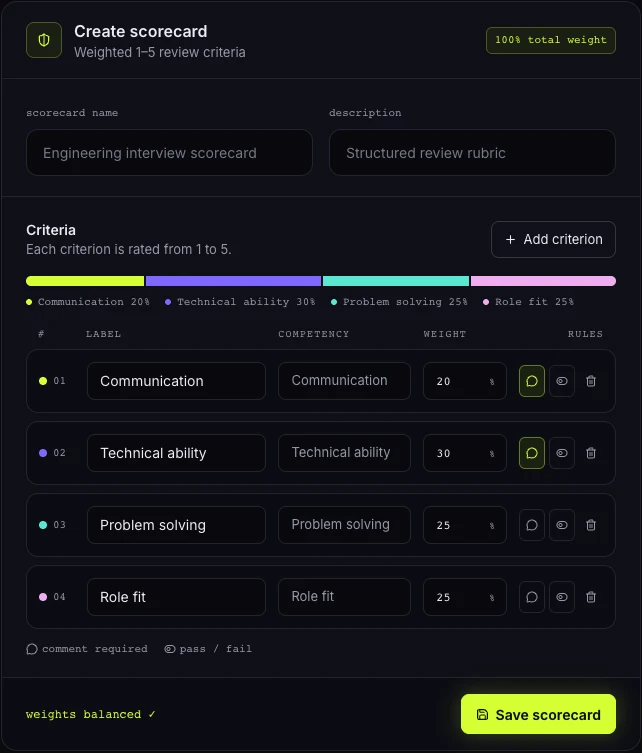 View full size
2. Assign it to the right interviews
In Assignments, select a scorecard for a template or a default for a job. A candidate review uses the template’s scorecard first. If the template has none, it uses the job default. With neither assigned, the review is unrated.
Worked scoring example
- Problem solving, 60%
- A rating of 4 contributes 4 × 0.60 = 2.4 points.
- Communication, 40%
- A rating of 3 contributes 3 × 0.40 = 1.2 points.
- Weighted result
- The total is 3.6 out of 5. The reviewer records Advance, Hold, or Reject separately and explains the evidence in notes.
Check your result
The saved rubric is assigned to a template or job and its criteria appear on the candidate’s review.