Configure external providers
Store the provider configuration your team needs for applicant tracking, HR systems, calendars, video, or webhooks.
Use an admin account and have access to the provider’s own configuration details.
1. Select the provider
In Integrations, choose a category or use More providers. Select the provider by name and read the description. The configuration form changes with the selection.
2. Enter only the required settings
Use the fields listed for that provider. For example, Greenhouse presents an API base URL, a user identifier, a credential, and scopes. Grant only the scopes needed for your intended connection. Enter credentials in the credential field.
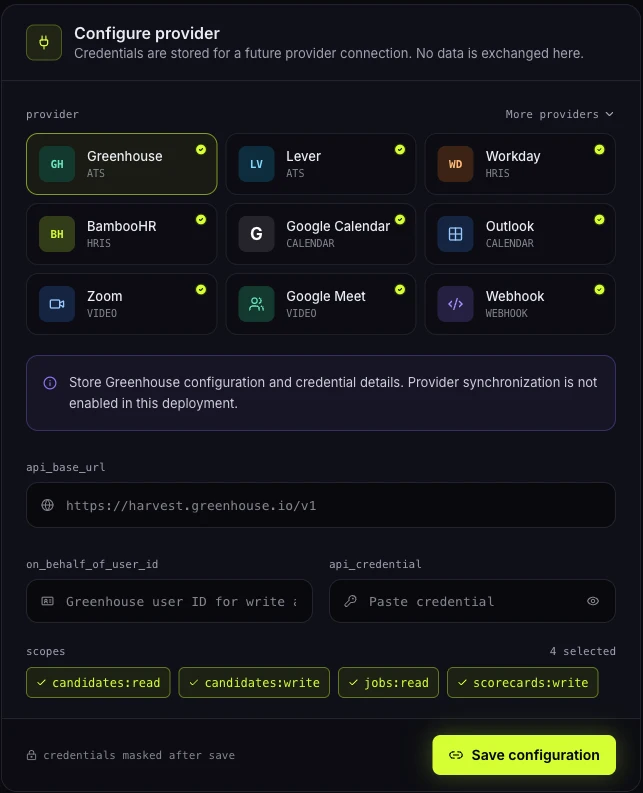 View full size
3. Save and inspect its state
Choose Save configuration and find the provider in Provider configurations. Check its status and credential indicator. Use Disable to pause the configuration, Enable to restore it, or Disconnect when the stored configuration should be removed.
4. Check what the deployment supports
Read the exchange notice in the panel. In a configuration-only deployment, credentials and settings are stored for future use. Verify an actual sync or event in the external provider before relying on it for a hiring workflow.
Check your result
The provider appears with the expected status and scopes. The exchange notice tells you whether external data exchange is available.